Okay, maybe it is not grammatically what the original phrase was about but I thought it was a good title. :}
We recently had a project where we were replacing a set of servers, and one of the things that caught us out during the PROD cutover was the firewalls! Firewalls between databases, firewalls between middle tier applications; some we had caught in QA, others we did not, but it all added up to extra time in our deployment that could have been avoided.
Take our mistake, and learn from it to make your next project that much more successful. I know the next time we have something like this going in, I am going to grill everybody available about the firewalls!
Showing posts with label Lesson learned. Show all posts
Showing posts with label Lesson learned. Show all posts
Tuesday, June 17, 2014

Wednesday, May 28, 2014
A cautionary SysAdmin tale: Rebooting a DC
Courtesy of @sql_handle on Twitter, I read this article from Joyent that every person in a SysAdmin, DevOps, PROD Support, what ever title you put on it, role needs to read. A person was able to take down an ENTIRE data center with a command based tool, without any additional precautions, so most customers had downtime for 20 minutes but some were down for more than TWO hours. Of course this is an extreme example, but it is important to realize that until the rubber meets the road you don't understand just how badly something can go with something this simple. Would a "two-key" type system have prevented this? What about additional parameters required on the command line?
Now that Joyent knows the flaws in their architecture, and there are some doozies which we should all review to make sure they aren't in our own architectures, they have put out a plan for how to move forward past this. Can they move fast and smart enough, while maintaining their internal controls, so that they don't create more downtimes for customers by implementing new and improved processes? Time will tell I guess, but this article helped me widen my scope a bit for just what could be pain points in the future.
Now that Joyent knows the flaws in their architecture, and there are some doozies which we should all review to make sure they aren't in our own architectures, they have put out a plan for how to move forward past this. Can they move fast and smart enough, while maintaining their internal controls, so that they don't create more downtimes for customers by implementing new and improved processes? Time will tell I guess, but this article helped me widen my scope a bit for just what could be pain points in the future.
Saturday, October 12, 2013
Learning more about Oracle Alerts
As a follow up to my previous article on Oracle Alerts, when I had shared that information with my team one of my co-workers pointed out that we should do Run as well as Verify because it could pick up other issues with your alert. So remembering that, I went to another alert which was erroring and Verify gave me the thumbs up but Run gave me the error being encountered:
APP-ALR-04108: SQL error ORA-01840: input value not long enough for date format
In the details for the alert are several variable lengths defined and one of the variables is too short for the date information being passed into it.
Friday, October 4, 2013
E-mail special characters and SQL
Looking at the system post “network issue” I found that the “Journal Import Health Check” (yes, that one) alert has been erroring after the alert was changed and looking back it’s been alerting for several days. Here is the relevant request log text:
Performing alert "Journal Import Health Check" (ROUTINE=alepaa) (FILE=7175946/alr/lib/alepea.c)
SQL error ORA-00911: invalid character
occurred while executing the user-defined SQL statement for this alert (STMT=select request_id,
decode(status_code, 'E', 'ERROR', 'X', 'TERMINATED', 'D', 'CANCELLED', 'I', 'SCHEDULED/NO MANAGER', 'NOT LISTED') as "STATUS"
from fnd_concurrent_requests
where concurrent_program_id = 20215
and status_code not in (
'C' --Normal
, 'G' --Warning
, 'Q' --Standby
, 'R' --Running
)
and (requested_start_date > sysdate – 1/24 OR actual_completion_date > sysdate – 1/24))
Looking at the SQL in the form for Oracle Alerts didn’t make me think there was any issue, and the alert showed:
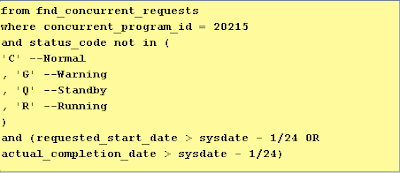
But when you copy and paste this into a SQL development tool it showed:

With ASCII characters instead of the minus sign we were looking for, and copying this back into the e-mail application shows:

It is hard to avoid something like this happening if we’re copying from e-mail, but this reinforces that after we change an Oracle Alert, we should utilize the Verify button to get it to run the SQL and make sure everything is correct:

Performing alert "Journal Import Health Check" (ROUTINE=alepaa) (FILE=7175946/alr/lib/alepea.c)
SQL error ORA-00911: invalid character
occurred while executing the user-defined SQL statement for this alert (STMT=select request_id,
decode(status_code, 'E', 'ERROR', 'X', 'TERMINATED', 'D', 'CANCELLED', 'I', 'SCHEDULED/NO MANAGER', 'NOT LISTED') as "STATUS"
from fnd_concurrent_requests
where concurrent_program_id = 20215
and status_code not in (
'C' --Normal
, 'G' --Warning
, 'Q' --Standby
, 'R' --Running
)
and (requested_start_date > sysdate – 1/24 OR actual_completion_date > sysdate – 1/24))
Looking at the SQL in the form for Oracle Alerts didn’t make me think there was any issue, and the alert showed:

But when you copy and paste this into a SQL development tool it showed:

With ASCII characters instead of the minus sign we were looking for, and copying this back into the e-mail application shows:

It is hard to avoid something like this happening if we’re copying from e-mail, but this reinforces that after we change an Oracle Alert, we should utilize the Verify button to get it to run the SQL and make sure everything is correct:

Saturday, September 28, 2013
Weekend Mystery: Primary Key Indexes
A few months ago I read this article from Arup Nanda, but it wasn't until re-reading it tonight that the lesson he was teaching us really sunk in for me. If a table has a primary key, you'd naturally think that duplicate values can't exist as the primary key right? WRONG! Arup shows us exactly why, as well as explaining why this is actually desired in some situations which taught me even more. Explore the mystery this weekend!
Thursday, August 22, 2013
What's the difference in a column?
This blog is filled with the times I'm just so brilliant, but this is not one of those times. In our due-diligence in verifying all our items, objects, and processes will stand up to being upgraded by R12 an analyst started asking us some questions about an alert which just so happens to be one I created. The statement was being made that "it does not pull up anything" which was curious to me, since I usually don't send alerts out unless I can test them successfully (often many many times) before putting my team on them. Sure enough, I went back to see that I DID test the alert and it DID show information so now I'm really curious and digging into the statements being made in relation to actual_start_time being selected as the criteria for the alert.
Seems innocent enough right? I had wanted to find out when a Journal Import ended within the first hour of it being in a non-normal status (Cancelled, Terminated, Error, you get the idea) but in fact that isn't what I asked the alert to do. Because I used actual_start_time, and not actual_completion_time, I was asking the alert to tell me if a Journal Import ended in a non-normal state only if it started within the past hour. How about that huh? So I looked back in the history of when the alert should have come out, and sure enough there was a Journal Import that started at 8 AM and didn't end abnormally until after 10 AM so when the alert ran this wasn't picked up. A good lesson learned that even with good intentions, you can do something completely wrong, and not find out about it until too late.
Seems innocent enough right? I had wanted to find out when a Journal Import ended within the first hour of it being in a non-normal status (Cancelled, Terminated, Error, you get the idea) but in fact that isn't what I asked the alert to do. Because I used actual_start_time, and not actual_completion_time, I was asking the alert to tell me if a Journal Import ended in a non-normal state only if it started within the past hour. How about that huh? So I looked back in the history of when the alert should have come out, and sure enough there was a Journal Import that started at 8 AM and didn't end abnormally until after 10 AM so when the alert ran this wasn't picked up. A good lesson learned that even with good intentions, you can do something completely wrong, and not find out about it until too late.
Wednesday, August 7, 2013
Concurrent reports not completing for a single person
Sounds like a weird situation right? That's what we thought too, but we weren't really laughing about it since it happened on our A/R Close night and we still had it happening after the DBAs bounced the Concurrent Manager. A few days later jobs by this person are still running and nothing is completing but I don't see any locks at the database and the OS_PROCESS_IDs from FND_CONCURRENT_REQUESTS aren't actually alive on the server. So what's going on? Well, the log files tell the story.
Upon closer inspection, it appears that the reports are actually completing all of their work before passing off the job for printing as all of the reports have the same last lines since the user is trying to PRINT TO THE SAME PRINTER. Alright. We have a Solaris OS machine here which we aren't running CUPS on, so lpstat -lp <printer name> should give us some details about the printer yet when I issue the command nothing happens. No detail results. No command prompt returned. Nothing. So it appears that the concurrent manager hands off the reports for printing, but if the printer exists and can't complete the request (in this case just hanging out there) the concurrent request will never continue to Completed.
After we get the printer issue resolved, I try to cancel the reports in Running status but the application locks up on me. Looking at the locks in the system I can see something is holding me up, but I don't think it is the concurrent request session but the concurrent manager itself so I can't kill it but I took the PROCESS number 14517 from GV$SESSION and went to the server:
[me@server ~]$ ps -eaf | grep 14517
applmgr 9895 14517 0 Aug 06 ? 0:00 /bin/sh -c lp -c -dPRINTERNAME -n1 -t"USERNAME.REQUESTID" /u01/app/applmgr/11i/i
applmgr 14517 3854 0 Aug 06 ? 0:07 FNDLIBR FND Concurrent_Processor
You can see that this process number corresponded to the requests which were running under the USERNAME (USER_NAME.FND_USER), REQUESTID (REQUEST_ID.FND_CONCURRENT_REQUESTS), and the PRINTERNAME (PRINTER_NAME.FND_PRINTER) so we can look at the other OS processes with that information:
[me@server ~]$ ps -eaf | grep USERNAME
applmgr 9895 14517 0 Aug 06 ? 0:00 /bin/sh -c lp -c -dPRINTERNAME -n1 -t"USERNAME.REQUESTID" /u01/app/applmgr/11i/i
applmgr 9896 9895 0 Aug 06 ? 0:00 lp -c -dPRINTERNAME -n1 -tUSERNAME.REQUESTID /u01/app/applmgr/11i/i
applmgr 7434 3303 0 Aug 02 ? 0:00 /bin/sh -c lp -c -dPRINTERNAME -n1 -t"USERNAME.REQUESTID2" /u01/app/applmgr/11i/i
applmgr 7435 7434 0 Aug 02 ? 0:00 lp -c -dPRINTERNAME -n1 -tUSERNAME.REQUESTID2 /u01/app/applmgr/11i/i
What I find interesting is that you can see in the first two lines the process ID 9895 is listed twice, and the same with the last two lines and process ID 7434 so we've learned something about Unix here that the printer OS processes are marked as children of the main concurrent request OS process. Next up, I issued kill -9 <OS process ID> commands for 9896 and 7435 as applmgr and after I kill the first one process 9895 disappears and the application is no longer locked up on me trying to cancel the report. Why? Killing the print job that was hanging at the OS level allowed the concurrent OS process to complete believing it was done printing, which then allowed it to report back to the application that it was done and allowed my session to "complete". Next up, I killed all of the other threads that had the lp command for our user and when I went back to the application to search for their Running reports there were no longer any reports running.
Sunday, August 4, 2013
Lesson learned: Rebooting a server
Following yesterday's post about encountering an issue with adding space via ASM, we learned a very valuable lesson with rebooting a server: don't leave your servers up for hundreds of days without a reboot. Why do I say that? What happens when you have a problem with your server and it needs to be rebooted, but you have had it up for 300, 400, 500, 800, 1000 days? When you reboot, fstab in Linux needs to check the associated filesystems and when you've left your server up that long the check has more to do but also you've let possible corruption creep into your system without regular reboots and preventative system checks by letting fstab check the filesystems at regularly scheduled times.
So now you're rebooting a server that has a problem, it is taking longer than normal (which needs to be planned for as well in your change plans) and you have no confidence that the filesystem won't be corrupted when it comes back up which can exacerbate an already critical situation.
So now you're rebooting a server that has a problem, it is taking longer than normal (which needs to be planned for as well in your change plans) and you have no confidence that the filesystem won't be corrupted when it comes back up which can exacerbate an already critical situation.
Subscribe to:
Posts (Atom)